The Signal Flow of a
Recording Studio
The Basic MPC "Hip Hop" Studio
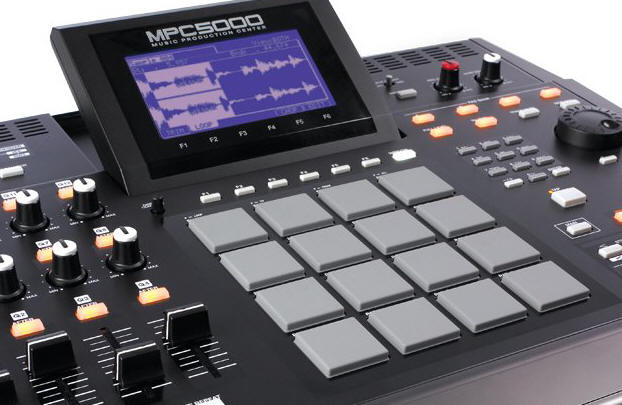
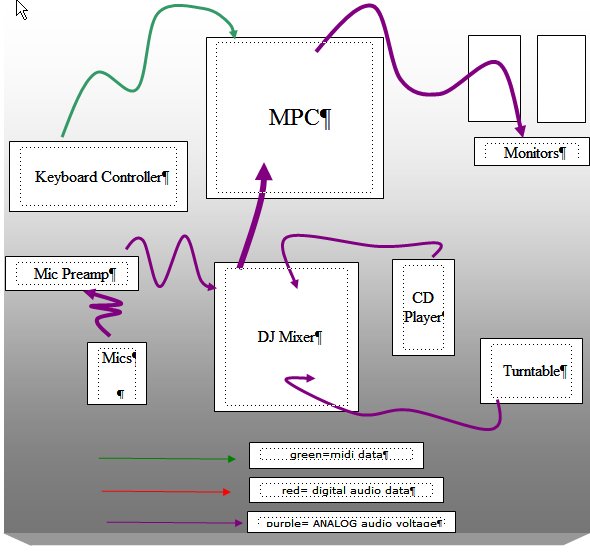
Ok! Lets be clear that there must be at least 10 ways to design an MPC 1000 studio. And at least 50 different ways to make a hip hop studio. You don't need an MPC to do hip hop music. But this article is focusing specifically on the MPC, because it is a different type of recorder than is the multi track recorder or computer based recorder. This is a simple setup, with the main purpose being recording and assembling a song. Notice no computer is required and there are no external paths for digital audio.
Studio Social Manners "Who be da Producah"(Producah is pronounced PRO-DOOSE-SAH) Teaching hip hop class to teenagers as I do, I have witnessed the legitimate role of the producah. While many people dismiss this role as ridiculous, (a "False Producer" I am here to tell you it is not. If there is no one in charge I can guarantee you the session is at high risk for failure. For every hip hop session there must be a producah and they have the following functions: 1. They decide who is supposed to show up, make arrangements ahead of time. They set the time for the session. 2. They decide who lays down the beat, who is the main rapper, who is the guest, and exactly what the others are supposed to do. 3. While they can accept input from others, they get to make the decision. If beatmaker does not show (common), the producah accepts input on who should make the beat. If push comes to shove, the producah must have the power to win all disputes. This is best done by being the studio owner, because if you shut it down, what are they gonna do? Its just as important for the producah to know how to use a sequencer. |
Yet the MPC is digital on the inside. All those analog sources coming from your Mic, preamp, turntable and CD player are digitized as samples as they are recorded in the MPC. These samples are triggered by MIDI notes, which occur by pressing a Pad on the MPC or by pressing a key on the connected keyboard. Inside the MPC is a MIDI and Audio sequencer. The song is "assembled" by moving bits and blocks of MIDI data which trigger the samples. While that is what is happening underneath, for the user, the experience is one of tapping on the pads and the keys after hitting the record button.
The chart above is based on the common MPC 1000, which only has 2 analog line inputs and no mic preamps. Because of this I show how to use a DJ mixer to add the analog inputs for a turntable and CD player as well as a common mic stereo mic preamp. The Mic preamp not only lets you connect microphones, but guitars, basses and other gear that has instrument level outputs.
Newer MPCs have digital i/o and USB connections. These are excellent for connecting to a computer for storage and for bringing samples into the MPC from sample libraries. The older MPCs use SCSI connections to proprietary Akai CD Roms. Don't go there, its a mistake unless you want to work they way we did in 1997!
The newest MPC 5000 has not only a sampler but also has an onboard soft synth. MPC5000 is the first MPC ever to include 8-track streaming hard disk recording, a 20-voice synthesizer with arpeggiator, a 100,000 note sequencing engine with 960 ppq resolution, pad and track muting and mixing, 64 continuous sample tracks. There's even a new FX engine with 4 FX buses and 2FX per bus.
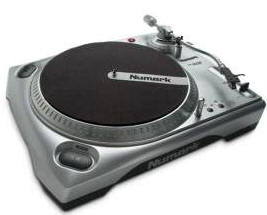
Notes
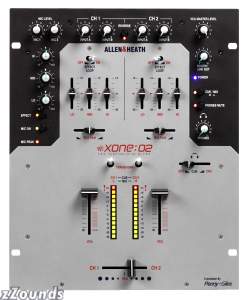
One way to same money on this rig is to get a DJ Mixer that has mic preamps onboard. However, there is a thing you have to watch out for. Some DJ mixers have hi impedance mic preamps (look like guitar inputs). These will NOT work with your professional mix with XLR jacks. Also DJ mixers might not have phantom power. That means you can't use a condenser mic. So be real careful on the DJ mixer. Two mixers that might be good for using dynamic mics, like the Shure sm57, 58, might be the Allen &Heath Xone 2 and Xone 32
The Software MPC--
You can mimic the MPC studio with a computer and software rather easily. A good sequencer like Sonar, Logic, Live or Cubase or Pro Tools Le outfitted with a drum type soft sampler like Motu's BPM and a few analog soft synths, an Akai MPD controller along with the standard audio interface with preamps, mics, and cables and you pretty much have it.
ADVANCED ONLY: Syncing an MPC's sequencer to a computer based sequencer.
This is not as simple as it sounds. I really don't recommend it for a newbie. There is much confusion over the word "sync" thanks to some ill informed people with MPCs. What sync does is allow BOTH sequencers to run together and lets each sequencer's transport buttons control the other. To do this there is one sync master and one MMC master (MIDI machine control ). Whichever is the synchronization master is the MMC slave. Note only the MPC 2500 and 5000 have (as of this writing 1/2010) MMC and sync by MTC. (Always remember, all MPCs are not created equal!) The MPC1000 uses MIDI sync which cannot synchronize both transports. (Only the master transport will work but the slave will still follow). However, even with MIDI sync you can have the MPC's sequencer follow the Computer sequencer.
Connections:
Computer MIDI Out to MPC Midi In
MPC MIDI Out to Computer MIDI IN
You also need to get audio to the speakers from both the audio interface and the MPC. The easiest way is to set up an Aux channel in the sequencer that takes the audio arriving ar the audio interface line inputs and routes it to the Main outs. You might also have to setup a track in the sequencer that defines this audio bus.
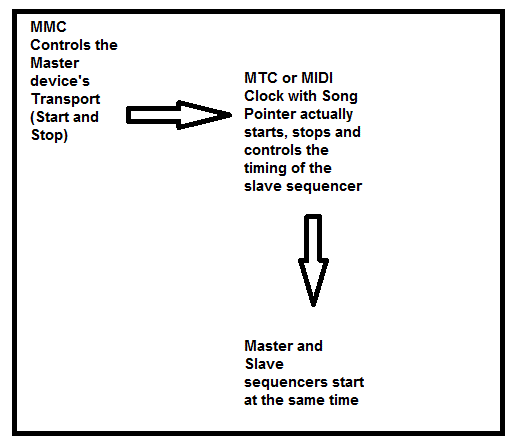
By the way, this is the same way you hook up a the sequencer in a keyboard workstation to an computer sequencer.
USING an MPC as a Controller, Sound Module and Sampler in a computer based rig
But note that you don't have to sync the 2 sequencers by MIDI to get your MPC working. You can still use the MPC as a controller, sampler and midi module. This is what most newbies should do. It works great. Your sequencer will trigger samples on the MPC and the MPC will play them with no latency. That is probably what our mis-informed user thinks "sync" is. I don't blame them though. This is a confusing area.
Connections:
MPC main outs to audio interface line inputs
Computer MIDI Out to MPC Midi In
As above you have to setup a bus to route the MPC audio through the audio interface. You can also use a mixer if you cannot afford to use the audio interface's line inputs. Here both the MPC and the Audio interface feed the mixer and the mixer feeds the speakers. Here the pads will trigger soft synths in the sequencer, your sequencer will trigger samples in the MPC which can either pass through the sequencer or be recorded onto tracks. See, its all a matter of signal flow and being able to follow the signal.
Read this thread for more on MPC/MTC/MMC synchronization
Here is another helpful link
Go to the Next Page

Tweak's Articles on Essential Studio Concepts