The Classic Analog Mixers
choosing a mixer Page 4
by Tweak
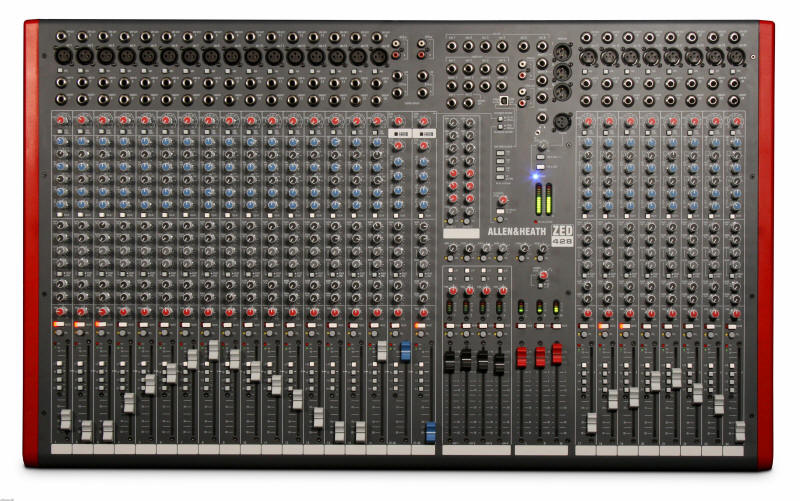
Allen and Heath ZED428 28-Channel Mixer with USB Interface Tweak: This mixer is bound to make many home studio operators very happy. Note the model number (428). Here that means 4 bus, 28 channels.
Don't think that because the board is "analog" that it is "old" and not as good. People love the dedicated faders knobs, the warm sound, and the immediate response of the sound to the twist of a tweak. There's no menus, no abstracted multi-function controls, the knobs and faders actually control the audio voltage going down the wire.
|
|

Analog mixers can be classed meaningfully by 2 variables. 1) The number of channels and 2) the number of busses. That's why you see most mixer have numbers in the model name, like a Mackie 32-8. That means 32 channels, 8 busses. Sometimes they add another 3rd number. Lets take a Behringer 2442 for example. That means 24 channels, 4 busses, 2 master outs. Unfortunately manufacturers don't always follow rigid definitions here and the numbers can be deceiving. Some "4 bus" mixers count the master outs as a bus, so its really a 2 bus+2 master outs. I will call those 2+2 bus mixers.
Before you buy, check the specs and make sure the mixer is a "true" 4 bus if that is what you want. For the number of channels, some manufacturers count the effects returns as a channel and some don't. So a 16 channel mixer might only have 12 channels and two stereo effects returns.
To add to the complexity, manufacturers are now adding USB and Firewire audio interfaces to their analog mixers. Remember what we said about "redundancy" a while back. You only need one audio interface in your rig and some of these may be very basic. Normally you connect an analog mixer to your existing audio interface.
Confusing? Yes. That's why you need me. I will get your through this. In all cases, read specs and find out how many channels the board really has not counting the aux returns. Also find out how many busses the board has not counting of the Master outs. If it has an audio interface make sure you know exactly how many channels it can send and return from your DAW.
To get information to make this page I went to manufacturers websites and dug the info out of product manuals. I suggest you do the same when you are ready to buy.
Types of Analog Mixers for a
Computer Recording Setup
The Main question: How many tracks need to be recorded simultaneously (i.e., at the same time)? You need as many inputs on your soundcard or audio interface to cover that first off. Then you need that many independent outputs (sub outs) on your mixer to mate with these inputs. These independent outputs are called "sub outs" or the "alt 3-4 bus". These are different terms for the same thing. You can also use direct outs if the mixer has them, if you don't mind re-patching the gear you want to record into it's path.
Types of Analog Mixers
- 8 Bus (ideally for 8x8 audio interfaces, standalone multitrack recorders)
- Analog Mixer with built in audio interface
- 4 Bus (ideally for 4x4 audio interfaces)
- 2+2 Bus (Ideally for 2x2 stereo soundcards)
- Stereo Only (Ideal for those only connecting mics and guitars for tracking though workarounds are possible)
- Rack Mixers
- Preamp only (for those going mixerless on a budget)
We'll talk about each one with examples to help you decide.
1. "8-bus" Mixers
If you intend to record a full band in your studio, you need a board that can handle lots of mics and instruments simultaneously and let you listen to tracks already recorded. Remember the drum kit might take 4-5 mics itself. You'll probably need to send a monitor mix out one of the busses, have inserts on every channel for patching stuff in during mixdown, generous sends and returns. 8 bus mixers are a great way to go. Take a look at the Behringer SX4882 or the budget Behringer SX3282 Mackie 24-8 and 32-8 mixers. More upscale is the Soundcraft Ghost. If you are using a computer to record, pair that to an 8x8 audio interface, like a delta 1010, or a MOTU828mk2. You are also able to mix all 8 outputs coming from the audio interface on mixer faders.
2. Analog Mixers with built in or optional Audio interface
This type of mixer is a full fledged analog mixer but also has either a firewire or USB digital bus to and from the DAW. Keep in mind the nature of this connection to the DAW may vary widely from simple 2 channels back and forth to elaborate multi-channel assignable i/o. Never assume this kind of mixer can return more than 2 channels from the DAW to the mixer unless it explicitly says it can. I tell you this because though it is true, it defies common sense. You "think" that you can mix 8 DAW tracks on 8 faders, right? In reality you cannot. The exceptions are typically expensive. With simple USB interfaces on mixers, you only get two channels returned to the mixer from the DAW. With the firewire or USB 2.0 interfaces on mixers you often get several outputs to the daw, but still only 2 inputs (typically) from the DAW.
There are two analog mixer with firewire interfaces that do allow you to mixdown several DAW tracks on the mixer. They are the Zed R-16 by Allen & Heath and the Mackie Onyx 1640i, both shown below.
Also keep in mind that if you use these built-in interfaces you probably will not be able to use you audio interface or soundcard if you have one in your sequencer application. Most sequencers only allow one audio driver. You need to ask yourself before you plunge: Is this interface really better than my audio interface? Still some of these mixers, like the Zed14 and the Onyx, are worth having for their analog features. Others make good all-in-one solutions for those on a budget or starting out.
Does this mean you can't mix on the mixer using those interfaces? Yes! If you want to mix on your 32 channel console that has a 2x2 audio interface you simply don't use that interface. Instead you use an audio interface that does have the ins and outs (i/o) you need.
3. "4-Bus" Mixers
A true 4 bus mixer means that the mixer has 4 "sub outs" or "group outs" in addition to its "Main Outs or "Control room outs" Busses are perfect for routing to audio interfaces. But you can also use direct outs, inserts, or sends to do that. Recall the warning that manufacturers' often tell you 2 busses+main outs equals 4 busses. Yes, technically, but they are muddying the water. That is why I have to draw the distinction between a "true" 4 bus and others. So you don't get hoodwinked into thinking you are getting more mixer than you are really getting.
If you are planning to record 3-4 musicians into the computer simultaneously, make sure you have at least that many audio interface inputs and preamps going to your computer.
Mixers that do have 4 sub outs are the Behringer UB2442, MX2642a, Alesis Studio32, Mackie 1604 VLZ Pro, ZED436, ZED420, ZED428, Onyx 1640, Onyx 24 and 32, Behringer SL2442, Mackie CFX16MKII Of course there are more. You have to read the specs carefully. Again, don't go by the digits of the model number. These extra outputs can be switched on for channels you are recording, and can be removed from the main mix while doing so, which prevents feedback. A mixer with sub outs lets you record to and play from your soundcard at the same time and have the mixer control all of it. If you have a 4x4 audio interface, like a Delta 44 or Delta 66, a mixer with 4 sub outs is fine. You can also use an 8x8 audio interface (like the MOTU828mk2) if the mixer has direct outs in addition to the busses, or you could just use 4 busses (which is all that most home studios need) and use the other 4 inputs of the audio interface for something else.
In the case of 4 musicians, each musician gets there own mono channel, assigned to a separate bus out to a separate channel on the audio interface. That way, in the sequencer, each will have their own isolated track.
4. "2+2 Bus" Mixers
If you do all
the recording yourself, one or two tracks at a time, or with one other person, you
each having a separate mono track, a mixer with only 2 sub outs is fine. The
UB1832FX, MX1604a, the
UB1204FX all are in this class, as is the Behringer 1604 and 2004.
So are the Mackie 1202, 1402, and many others. A suitable 2x2 soundcard for
these is all you need, like an m-audio audiophile 2496, Emu 1212m. Of course
you could use a 4x4 or 8x8 interface with these too. In the case of a 4x4,
you could route all 4 outs back to the mixer and play with your mix there.
5. Stereo Mixers
These are for people that just want to get their stuff recorded on the computer and are monitoring from the output of the soundcard or to a stereo receiver connected to the soundcard. That's fine. However, a little stereo mixer that only sums to one stereo out is NOT going to cut it here if you want to control the input and output of the soundcard. Many people buy stereo mixers and later find they really needed a 2+2, so I will spend some energy on this issue. Don't confuse the "main outs". "control room outs" "tape outs" with sub outs. Rephrased: You cannot use these to record to a computer and have the mixer play back the recorded output. You'll get feedback, or you will be unable to separate the track your are recording from the tracks playing back. The really inexpensive mixers (like the Behringer 802a and even some mid priced mixers) do not have sub outs. Stereo mixers are good for those only recording their mics and guitars and not running the soundcard out back to the mixer. Lets recap, stereo mixers are not ideal for computer recording. Consider the stereo mixer to be an input expander for your soundcard, not an output expander.
Examples of Stereo Mixers
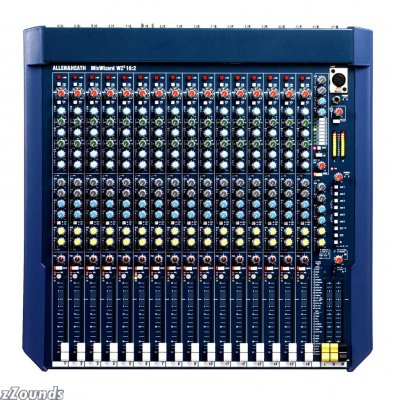
Allen and Heath MixWizard WZ3162DX 16-Channel Mixer Tweak: Thanks to its superb quality and availability of direct outs, you can use the MixWiz with an audio interface nicely.
|
|
 Behringer
XENYX 1002FX Mixer with Effects
Behringer
XENYX 1002FX Mixer with Effects
6. Rack Stereo Mixers
Tweak: Great for studios with lots of outboard gear, synths, recorders
There are workarounds, if you already have one. If the stereo mixer has direct outs (most do not) you can use those to route to the soundcard. You can also use the aux sends to get a signal to the soundcard. That means forget about adding effect processors. If your mixer has a switchable tape in out path that removes it from the master outs, you might be able to monitor from those. However, many inexpensive boards don't have that facility. If you use the master outs, control room outs or tape outs you may have feedback problems. So my advice is, if you want to both record to and playback from the computer on your mixer, get a 2+2 or a 4 bus. It's so much easier and you'll be happier with the mixer and will be able to keep it longer as the studio expands.
7. Inexpensive Preamps for 2x2 Soundcards
This is a solution for the person that want to monitor from their speakers connected to the soundcard but want to connect higher quality mics with XLR connectors. Using this "mixerless" approach, you would do all your mixing in your computer application's software mixer.
Summing Up (ouch!)
Whew! You made it through a tough lesson here. If it did not make sense go back and read it again.
To sum up for now, mixing music is an art form. It is the control surface for your musical ear. Consider that first. Be careful not to take on more technology than your vision inspires, yet remember with mixers you want to cover your future needs as well as your current needs. Yet if you envision a music that takes the most sophisticated of tools to get where you want it to be, follow your flow. After all, its just a flow of electrons disturbing the air in ways we have associated with pleasure.
Recommended Reading
Links
The Perfect Mix And notes on Post production
Read my article on mixing in the digital domain for more ideas on this
Threads
- Tascam DM3200 Discussion
- Allen and Heath ZED428 has arrived
- Digital Mixers
- Yamaha 01v96v2 with RME 9652 or N12
- A&H Zed
- mixers with mix b inputs berenger mx9000, yamaha pm1000 and?
- Onyx 1640/MOTU 24io Hookup
- new Behringer XENYX mixer
- Toft ATB - Balanced/Unbalanced Direct Outs?
- Am I Understanding This Right?
- Help with choosing a mixer
- Brain overload!! - entry level mixers
- new mixer - digital vs analog and recommendations
- Mixing Desk VS Control Surface. No Holds Bar :)
- Mixer Agony!
- Yamaha MG12/4
- Mackie 24X8 or Behringer MX9000
- Yamaha MG series vs. Soundcraft spirit series!
- your personal and professional opinion on YAMAHA MG32/14FX
- Behringer MX series preamp Question
- MX9000 or Mackie 24-8 bus--Which is better-
- Behringer MX9000 Based Studio Setup
- Behringer UB 1002 or Yamaha MG10/2 ??
- Lowest "Acceptable" Pro-Mixing Console?
- Behringer MX1604 vs. UB1204-Pro???
- Mackie d8b vs Mackie analog 8 bus mixers
- Aux Sends question....stereo or mono?
- Please don't bite my head off I'm confused.
- help choosing a mixer, please...
- Why use a 4 bus for computer when the main outs are not in use?
- Behringer MX3242X Review
- Behringer DDX3216 + ADT1616
Polls
Which product line
has better Mixers for recording overall? Behringer,
Mackie, Yamaha, Alesis, Phonic
Best USB Mixer $150-200
Mixers from $250-350
Best Value
Mixers from $350-550
Best Value
Mixers from $600-850
Best Value
Mixers from $900-$1300
Best Value
Reviews
Review of the Mackie 1402 VLZ Pro
|
Cool Quote: Dust as we are, the immortal spirit
grows
|
Go to the Next Class

More Articles by Tweak on Mixing and Mixers