Everything
you were
afraid to ask
about Cables
for your home or project recording studio
by Tweak
One of Tweak's jungles of cables, in fact, one of the more orderly ones.
Putting together a home studio requires a mind that can visualize, in a second, the signal flow of the entire studio from every remote piece though interfaces, patch bays, mixers, your computer and then the seemingly thousands of virtual cables and switches inside each computer application. To become the master of your recording studio, whether it is large or small, you must always know where your signal is and know how to get it where you need it (to your recorder, most of the time). We connect signals to pieces of gear with cables. To maintain the integrity of the signal, we need to understand which cables to use to connect our gear. This page is designed to answer all the cable issues a home or project studio is likely to confront and get you past the common misunderstandings newbies have.
The glossy ads in the trade magazines always
show gear in it's ideal pristine state, shiny, new, and never with cables
connected. Perhaps this is a psychological point, to make the prospective
buyer get a sense of how nice it would be to have this box sitting there.
In the real world, however, there are a tangle of issues for installing almost anything.
Most of these entanglements are cable related. With each piece you buy, the
living sea of cables behind tables and racks get denser and more knotty clusters
develop, making the act of even tracing a cable from origin to destination a
matter of great intricacy.
The more cables you have the harder they are to control. You think, "oh, I need a patchbay" to control them all. But the patchbay itself will generate even more cables. Then you think, I got it, I'll use cable ties. But these lead to problems of making sure all the cables have the right length, which again leads to buying more cables to get all the lengths even. You might refrain from getting more gear so as not to upset the fine cable job you did.
|
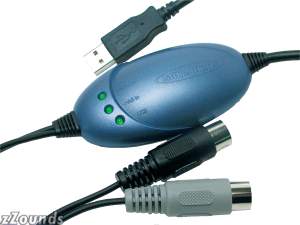 The MIDISport Uno is a 1x1 MIDI interface that is
totally portable, hot-swappable, and powered completely by your
computer's USB port. Drivers support all Windows operating systems 98SE
and higher, as well as Macintosh OS 9 and Mac OS X.
M-Audio MIDISport UNO 1x1 MIDI Interface with Cables and Connectors |
 |
|
|
Q) What is the difference between balanced and unbalanced connections? A)TS--tip and
sleeve (1 conductor plus ground) is for unbalanced signals. Note: It is the signal that is unbalanced or not. Using a TRS or XLR cable does not make an unbalanced signal balanced. However, if you use a TS (or RCA cable with adapters) on balanced signal, the signal will become unbalanced. Keep in mind that both the source and destination gear must pass balanced signals and you must use TRS or XLR cables to maintain the balanced connection.
|
Ok, many of you are still in trouble. Let me spell it out.
Balanced gear
Balanced
gear
Balanced gear
unbalanced gear |
|
Q) Can you plug an unbalanced TS plug into a balanced TRS jack A) Yes. In most cases there is no problem with doing so. If the manufacturer says you can use unbalanced or balanced it is fine. |
Q) Does that make the unbalanced gear balanced
|
|
Q) How can I make my unbalanced synth Balanced? A) With a direct box, or line level shifter, the unbalanced signal is converted to a balanced signal.
|
Q) Can you use an XLR to TRS cable and keep a balanced signal path?
|
|
Q) Can I use an XLR Mic cable as a balanced instrument cable with TRS adapters?
|
|
|
Q) Are "Guitar cables" the same as "instrument" cables?
|
|
|
Q) Can I connect my XLR mic to my soundblaster 1/8" phone jack? A) Yes, you can make it happen with adapters, but you will defeat the balanced signal. The Mic will likely hum and sound like garbage.
|
Q) Is a headphone balanced?
|
|
Q) Can I connect my turntable to the RCA tape in jacks on my Mixer? A) No. The turntable is a very weak signal that needs a preamp and a ground.
|
Q) Can I connect my line level tape deck outputs to the instrument level HiZ jacks on my audio interface? A) Usually Yes. Turn down the trims as low as you can. If there is no variable trim knob (like on ultra cheap gear) then the tape deck might be too hot. |
|
Q) Is it wise to run two signals to a single jack on my mixer with a "Y" cable? A) No. You risk adding noise and hum and the gear does not like it. You might even damage your gear. Its a rule: Never force two outputs into an input (that is why we use mixers). |
Q) Are plastic molded plugs worse than those with metal housings ? A) Yes. You can't repair those with plastic moldings. With good quality metal housings you can re-solder the leads when they break, and cables nearly always break near the plug or where the strain relief is. |
|
Q) Ok then, Can I split the output of a device with a Y cable to go to two destinations. A) Yes. That is fine. A common use of this is to split a mono effects send to go to both the left and right input of an effects box.
|
Q) Can you use a TRS to TRS cable with 1/8" (headphone) adapters and connect a stereo soundcard output to a stereo mini disc input?
|
|
Q) Can I use an RCA cable as a digital s/pdif coax cable. A) If it is well shielded, it might work. With a cheap cable, the data may get garbled and your computer will send up alert boxes saying "unknown format", or "wrong sample rate", or something unintelligible. Ideally these digital cables have 75ohm cable in them (like your TV cable). You could make one out of extra TV cable you have laying around.
|
Q) Can I use a DB25 serial cable as a SCSI cable? A) I've done it. However, some db25 do not have all 25 pins connected. These won't work. Also, premium SCSI cables have special shielding (which is why they are so thick) and a limit on length. So if you use a 25 foot DB25 modem cable you are asking for big trouble.
|
|
Q) Can you hear the difference between quality analog cables and cheap ones. A) Yes. When the cheap ones break.
|
Q) Do you think cable ties are a good idea? A) Makes things neater and might let you vacuum more often, but is also harder to rip apart when one cable goes bad or needs to move. |
|
Q) Is the ADAT toslink connector the same
as a s/pdif toslink connector? A) Yes. The same cable may be used too.
|
Q) Is it true that ADAT cannot handle sample rates over 48kHZ? A) For 8 channel transmission, yes, but manufacturers use two methods to work around this. The ADAT lightpipe cable has a limit to much data can be transmitted through it. Audio interface makers often solve this problem by only letting you use only 4 of the 8 inputs and outputs at the 96kHz rate. The newer alternative that is appearing is to add additional ADAT ports to split the load. This are often called the "dual SMUX" protocol. |
|
Q) is there an adapter for ADAT cables that can give you 8 separate digital outputs? A) Not inexpensively. There is no common adapter for this task. A conversion boxes exist for this task but they are quite expensive.
|
Q) Are there RBUS, TDIF and ADAT adapters that allow you to go from one format to another? A) As above, there are no adapters for this task. However, there are conversion boxes for RBUS to ADAT and some audio interfaces can convert ADAT to TDIF and vice versa, like the MOTU 2408.
|
|
Q) OK then, is an ADAT LightPipe the same as an ADAT cable the same as a home theater "optical" audio cable with toslink connectors? A) Yes. All three terms refer to the same cable. That is a Fiber Optic cable with toslink connectors. ADAT cable and LightPipe mean the same thing. Note that there is also an ADAT SYNC cable which should not be confused with the above. The sync cable is used when you connect up two or more ADAT recorders.
|
Q) I am thinking if I buy super high quality MIDI cables, my audio tracks will sound better, Any ideas? A) Argh. You need to go here again. Dude, get it straight.
OK class, someone got it wrong so stand up and Lets all Sing: Audio.... does... not.... go .....down.... a.... MIDI..... cable It..ne-ver...does It ne--ver did It ..ne--ver...will... Lol |
Many cable questions and answers are in the studio central forums. Search the forums Or enter the Studio accessories and Cables Forum
Go to the Next Class

Go to the Previous Class
Cool Links:
Soldering and making you own cables by James at www.music-in-your-ears.com
Tutorials on Cable Building and LOTS more at Shavano Music Online
Tweak's Articles on Essential Studio Concepts