Choosing a Mixer
Page 3
So, Which Mixer is right for you?
That's the tough question.
So lets get to it.
|

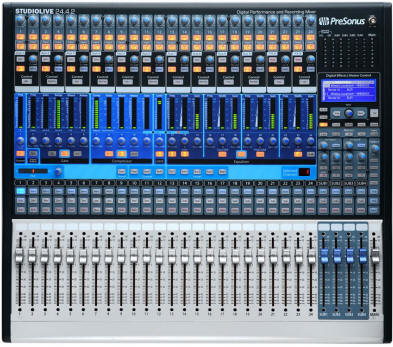
New for 2010, the Presonus StudioLive 24 is both a digital mixer and a 32x26 Firewire interface. Traditionally, digital mixers did not have audio interfaces. Typically they were used by professionals to connect to multi track recorders (particularly Alesis ADAT). With the StudioLive series of digital mixers, as well as the Onyx "i" series of analog mixers with Firewire, its is now well accepted that the computer is the defacto multi track recorder.
Digital Mixers
Going to digital mixing is not a decision you want to make lightly. The question: is the perceived audio result worth the trouble of learning yet another gear language, dealing with menus and submenus? It's not for everyone. Many of the functions of a digital mixer can be had without one. MIDI sequencers can do volume fades, effects fades, and can automate virtual effects sends and returns, pans, even eq sweeps. If you are planning to do automation at the sequencer level, do you really need another layer of automation after that? I say no. However, if you are interfacing a stand alone multi track recorder that does not have an onboard mixer (or only has a simple one) such as an ADAT, Roland, Mackie, Korg or Tascam 8, 16 or 24 track recorder, then you bet, a digital mixer will let you automate your rough tracks and polish them down to sweetness. And for the true die-hard tweaks who want every nuance of their mix recallable, including bus destinations, internal effects settings, onboard eq and compression settings, a digital mixer will reward them with consistent, repeatable performance.
Perhaps the main advantage of going digital is that you can keep your signal path totally in the digital domain all the way to the computer. Is this True? Well yes. If. That is, if most of your studio is digital. If you like to use global inserts on the mix bus, that is, route the master out through a compressor, finalizer, eq, you better make sure it's digital too, or you will be doing extra da/ad conversions. Read up on the quality of analog to digital converters, this is a picky point with the pros. Also double check on the number of analog inputs you get. Its very common for a piece to tout 24 channels but only have 8 analog inputs. When you add in the price of 2 extra analog expander modules to take you to 24 you find yourself at a premium price point over and above a classy 48 input analog dream board.
|
PreSonus StudioLive 16-Channel Digital
Mixer
with FireWire Interface StudioLive is the most powerful and flexible sixteen-channel digital mixer the world has seen. Loaded with sixteen high headroom XMAX microphone preamplifiers, built-in 32x18 FireWire recording and playback engine, "Fat-Channel" processing with 4-band EQ's, compressors, limiters and gates, DSP effects, six aux buses, four sub-groups, extensive LED metering, mixer save and recall, channel-strip save/recall/copy/paste, talkback and more, breaking new boundaries for music performance and production. 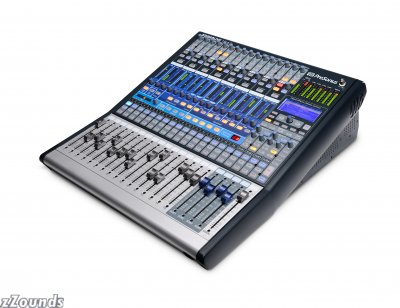 |
Mixing is like sculpting. Something the hands do on a board. This is why analog boards remain popular. While these craftsmen may be the last to think they need a digital mixer, they are probably the most suited to realize their benefits, the biggest of which is to be able save and collect these beautiful, hand carved mixdown configurations, with all the send and returns set just right, recallable when the need arises. Professionals doing film scores already know this. They don't want to waste time remaking the scenes that come up again and again in their work. It allows them to have templates for the may types of music they are called upon to make.
If you are using a digital multi track that already has a built in mixer, you might only need a rackmount mixer for your arsenal of synths. You can route different sources to different tracks easily. Just make sure you have enough preamps to cover your mics.
Digital mixers make a lot of sense with 24 track machines because you can use the digital piping schemes like ADAT lightpipe and TDIF to send 8 channels down a single digital cable. They are also now increasing coming online for small to mid size venues. One product introduced in 2008 and now available is the Presonus StudioLive. The StudioLive digital mixer comes with its own software, called CAPTURE, and has its own built in 32x18 audio interface. The StudioLive is also compatible with major sequencers.
One idea here is to use the StudioLive as a Live performance automated mixer. Basically one could build their entire show or songs, with backing tracks, effects routings, pre-recorded sequences and perform on top. This could give a small ensemble a really big polished sound.
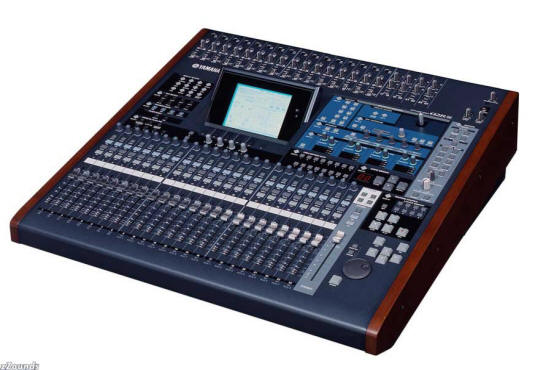
Digital Mixers often do not come inexpensively. Lets look briefly at the Yamaha 02R96VCM digital mixer. Weighing in a 10 grand, this digital mixer has ancestors that go back to 1995, when the original 02r was introduced. What one gets for the price is a digital mixer that can handle many different situations, from DAW recording/mixing, to live shows, to surround.
|
MAudio Project Mix I/O Control Surface/Interface
Today, more professional music is produced at home than ever before -- and the new ProjectMix I/O delivers what you need to take your computer-based studio and productions to the next level. Seamless integration with all major DAW software. The ability to record directly into industry-standard Pro Tools sessions. Faders so you can feel the mix with your fingertips instead of dragging a mouse. On-board display of critical parameters for intuitive operation. Motorized control to craft more accurate mixes.
What's This? Is this a Mixer?
Tweak: No. This is one of the newer combination devices. It's really not a mixer though it looks like one. Rather it is an audio interface, control surface and MIDI interface, rolled in one box. It doesn't have the onboard FX of a true digital mixer, but instead allows you to control your software mixer in addition to analog and digital inputs. The software mixer in the computer is where the mix actually happens.
So, are you using a modular multi-track like an Alesis ADAT, or a hard disk recorder like a Mackie HR 24, Alesis HD24 or Tascam X48? These "modular" type multi-track recorders have no mixer of their own, so you will need either a large analog mixer or a digital mixer with the right number of channels. Count up the number of tracks. 24? You will need that many channels to play them all at once. Now add more channels for inputs to the multi track recorder. This is where boards with "in line monitoring" come in useful. You actually use the same channel strip for input and output of the recorder.
Or do you want a full fledged digital mixer to control the digital i/o of your DAW's audio interface? Note that some digital mixers can be used as both an audio interface, DAW controller surface and digital mixer.
Analog Mixer/Audio Interface devices
These are getting increasingly popular, so we will spend some time on them. The idea was simple enough. Lets add a firewire port to an analog mixer design so it can be used to connect to a computer. With one of these, you don't need an audio interface or a soundcard. Instead of going "mixerless", you are essentially going "soundcard-less". Right now there are a few variations of these products. 1. Those with Firewire options, like the Mackie Onyx series, the Alesis MultiMix Firewire, Phonic Helix and 2. those with USB options, like the Behringer XENYX series, Alesis MultiMix USB and Yamaha MW12. The Onyx has been out for a while and is getting great reviews on studio-central. Many of the others were introduced more recently like the Allen & Heath ZED series and more recently the New Mackie Onyx "i" series, not to be confused with the older Onyx mixers.
Does it make sense to go one of the analog mixer/audio interface combos? As always, it depends. But I think it certainly will make a lot of sense to many people building a home studio. The critical question is as always, does the unit have the inputs and outputs you need? Because it is replacing the soundcard or audio interface you have to ask the same soundcard-type questions. How good are the converters onboard? How well do the drivers (if any) operate with my sequencer? Are these mixers USB 1.1 or 2.0 and will USB 1.1 be fast enough to do multiple tracks with little latency? Be careful as you might not be able to top the performance of your current audio interface.
Examples of Analog Mixer/Audio Interfaces
A good thing about this type of mixer is that is it a full fledged analog mixer without the firewire/USB, so you can use them just like an analog mixer if you like. There is also the possibility of adding one of these as a second audio interface to your system, giving you more i/o. Here you have to be careful about word sync issues as some computers might not like having 2 firewire audio interfaces from different manufacturers unless the word clocks on each are synchronized. The jury is still out on this possibility, so if you have something to say here, please do post at studio-central about your experiences on compatibility.
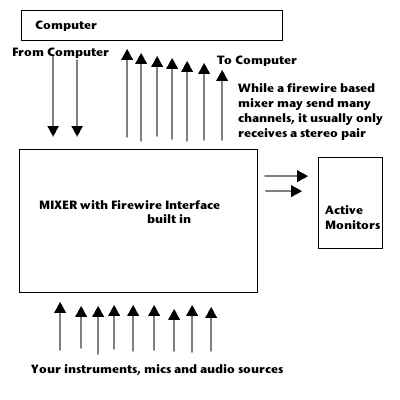
Mixers with built-in firewire interfaces usually can send several channels to the computer but only return a stereo feed for monitoring. You do the actual mixing in the computer in your sequencer. USB mixers usually only send 2 channels to the computer.
However, the design of mixers with integrated firewire audio interfaces is starting to change. The Zed R-16 and the Mackie 1640i are exceptions. For example, the new Mackie Onyx 1640i can output 16 channels back to the mixer, perfect for analog mixing of your digital tracks. This trend is hot and will be on more and more products. Go up to that chart above and add 16 ins and 16 outs from the computer. That's power dude!
Finally the audio interfaces on mixers are starting to get better. Firewire based mixers like the Zed16 can input and output several digital channels to and from the computer. With the Zed, you can actually mix on the mixer once again! You always want to check what the i/o of the audio interface is on any combo mixer you get, Remember, never to confuse the mixer section's i/o with the audio interface section's i/o.
Advantages
- You don't need a soundcard or an audio interface
- You can connect your monitors to the mixer's control room outs which have a volume control
- You should be able to easily use headphones
- You have more routing options than a soundcard provides and can use outboard processors
- You can use it as a standard analog mixer if your computer can't deal with Firewire or USB audio
Disadvantages
- Firewire and USB may have issues with your motherboard (same as Firewire and USB soundcards may).
- USB 1.1 mixers are typically limited to recording 2 tracks at a time.
Go to the Next page on Mixers

Go to the Previous page on Mixers
More Articles by Tweak on Mixing and Mixers